Lyric videos & visualizers
Extract lyrics and timing from a track. Fill your template with the lyrics, release artwork, and audio.
Track + cover image → music videoPrepare captions, fill your video template, join clips, and upload to YouTube. Set up the steps once, then run them with new media.
Plans from 49€ / month. Fully hosted by ONYX.



A lyric video workflow takes a track, artwork, and a template. Each step produces the files or data needed by the next.
Supply the song, release artwork, and track name for this video.
track.wav + cover.jpgExtract lyrics and timestamps, then pass them to the template.
Lyrics + timing cuesReplace the named layers in your After Effects template and join the rendered clips.
Template → video.mp4Send the exported video with a generated title, description, and tags.
Video + metadataUse a song catalog, a collection of gaming clips, or a series of scripts as the inputs for a repeatable video format.
Extract lyrics and timing from a track. Fill your template with the lyrics, release artwork, and audio.
Track + cover image → music videoJoin your selected clips with an intro and outro. Add captions, fades, and a backing track to the sequence.
Selected clips → highlight reelReplace narration, text, and images for each episode. Reuse the title sequence, layout, and outro.
Script + visuals → next episodeKeep the fonts, layout, and animation in your template. Replace the title, artwork, and audio for each release.
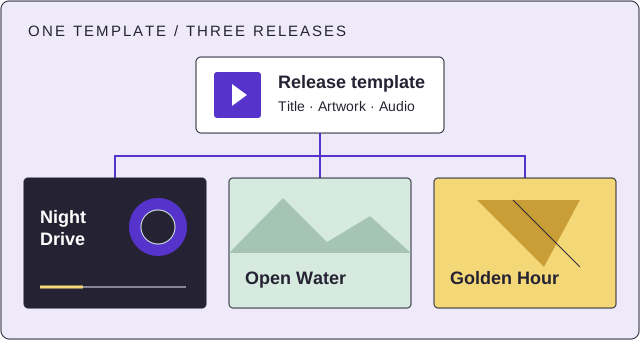
Map a track name to the title layer, artwork to an image layer, and a song to the audio layer.
Use AI steps to extract timed text and generate titles, tags, and descriptions from your content.
ONYX operates the workflow and render servers. Your team shares the publishing, token, and render allowances in your plan.
Compare team sizes, publishing limits, and rendering allowances.